Excavator Boom Control
This tutorial simulates a hypothetical control function for the boom motion of an excavator. The function is written in C and focuses on clarity rather than safety and reliability, so do not use it in a real control system.
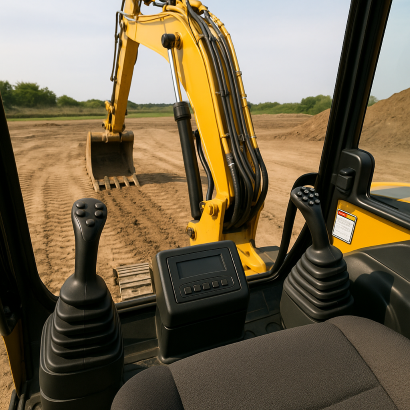
Example system
The block diagram below shows what the function does.
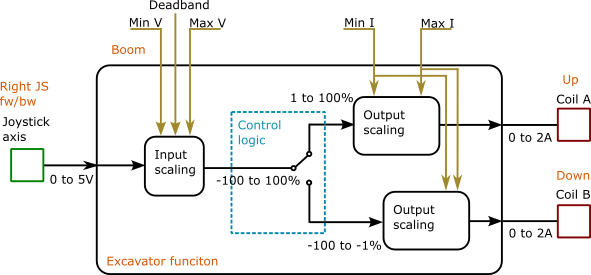
The input comes from an electrical joystick connected to a standard 0–5 V analog input. The joystick signal ranges from 0.5 to 4.5 V. The output drives the two coils of a hydraulic valve through standard current-controlled (valve) outputs, in the range 300 to 700 mA.
Typical controllers for this kind of software include:
- BODAS controller RC5-6/40
- IFM CR0708
- TTControl HY-TTC-32
The joystick and the valve never use the full range of the controller's I/O, so the function has parameters that scale the signals and compensate for fluctuations in the analog value.
The control itself applies the joystick value proportionally to the output for the requested direction. There are many ways to structure this internally. This example scales the joystick to -100% to +100%: positive values drive the boom-up coil and negative values drive the boom-down coil.
Simulating the system
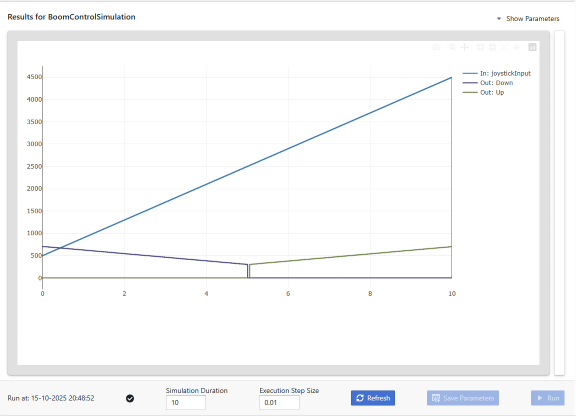
The simulation feeds the controller a joystick ramp that runs through the whole range, from 0.5 V (full down) to 4.5 V (full up), over 10 seconds. It records the joystick signal and the current commanded to each coil.
BoomControlSimulation.c
#include <cppmodel/CModel.h>
#include "BoomControl.h"

void RunCyclic(CModelSimulation_ts *self, unsigned long currentTime_ms)
{
    HydraulicValveOutput_ts outputContext;

    /* Ramp the joystick from 500 mV to 4500 mV over the whole simulation */
    uint32_t joystickInput = CppModel_getInputU32(self, "joystickInput",
                                                  500 + (uint32_t)(4000ULL * currentTime_ms / self->time_ms));

    BoomControl(joystickInput, &outputContext);

    CppModel_setOutputU32(self, "Up", outputContext.coilUp);
    CppModel_setOutputU32(self, "Down", outputContext.coilDown);
}

int main(void)
{
    CModelSimulation_ts *simulation = CppModel_create("BoomControlSimulation", 10000, 10);

    CppModel_setRunStepFunction(simulation, RunCyclic);
    CppModel_Simulate(simulation);

    int result = CppModel_getSimulationResult(simulation);
    CppModel_destroy(simulation);

    return result;
}
CppModel_create() takes three settings:
- Name (
"BoomControlSimulation"): identifies the simulation in the CppModel workspace. - Total time (
10000ms): how long the simulation runs. - Step time (
10ms): how oftenRunCyclic()is called. This matches a typical 10 ms control task.
RunCyclic() receives the current simulation time. There it sets the joystick input, calls the controller and records the outputs. This is a minimal CppModel simulation.
Compiling
Download the CppModel library for your platform from CppModel Workspace and extract it into a dependencies folder (see Installation). Then add a CMakeLists.txt next to the simulation:
cmake_minimum_required(VERSION 3.21)

project(BoomControl LANGUAGES C)

list(APPEND CMAKE_PREFIX_PATH "${CMAKE_SOURCE_DIR}/dependencies")
find_package(cppmodel REQUIRED)

add_executable(Runner BoomControlSimulation.c controller/BoomControl.c)
target_include_directories(Runner PRIVATE controller)
target_link_libraries(Runner PRIVATE cppmodel::cppmodel)
cppmodel_deploy_runtime(Runner)
Build it:
cmake -S . -B build
cmake --build build
Without CMake, compile and link directly. On Linux, adjust the paths to match your library and code locations:
gcc -o Runner BoomControlSimulation.c controller/BoomControl.c -Icontroller \
    -Idependencies/include/cppmodel -Idependencies/include \
    -Ldependencies/lib -lcppmodel -Wl,-rpath,'$ORIGIN'
cp dependencies/lib/libcppmodel.so.1 .
Running
The first time you run the program, it prints a login link to your CppModel workspace. Open it to log in. After the run, find the simulation in the workspace under the name set in CppModel_create() to see the results.
Code
Download the example from https://download.cppmodel.com/SimpleBoomControl.zip.
The archive contains a C++ version of the simulation (BoomControlSimulation.cpp) and Windows libraries, both written for CppModel 0.4. The controller code is the same. To use the current library, replace the simulation with BoomControlSimulation.c from this page, replace the dependencies folder with the current library, and build with the CMakeLists.txt above.