Code-First Simulation: Start With the Code, Add What You Need

Developing control system software involves more than implementing algorithms. Engineers must understand how their software behaves, evaluate different configurations, and verify that changes satisfy the requirements. Yet investigating that behavior can require significant preparation, particularly when simulation depends on building separate models or accessing physical machines. As AI makes producing new implementations faster, the time needed to evaluate them becomes an increasingly important part of development.
Code-first simulation offers a practical starting point: execute the production code, provide the necessary inputs and parameters, and observe its behavior over time. Engineers can compare implementations, explore parameter ranges, and evaluate results against defined criteria. Recorded machine data or physical models can be introduced when the engineering question requires additional context, rather than making them prerequisites for every experiment.
The benefit is a shorter feedback loop between implementation and understanding. Engineers can investigate more alternatives earlier, identify unsuitable configurations before machine testing, and make better use of the time spent with physical equipment and experienced operators. The goal isn't to replace detailed simulation or real-world validation, but to start with the simplest experiment that provides useful engineering evidence.
Start With the Production Code
Consider a motion-control algorithm in a mobile machine. The operator requests a velocity, but the controller must prevent sudden changes that could cause uncomfortable or even unsafe movements. A simple approach is to limit how quickly the commanded velocity can change. A real implementation may have separate acceleration and deceleration limits, along with additional logic to shape the response, but our example uses a single limit for both directions.
The engineering challenge is not only to make the movement smooth. The machine must also respond quickly enough to the operator's commands: limits that are too restrictive make it feel sluggish, while aggressive settings can produce undesirable movements. We can investigate this trade-off directly with the production implementation.
In an earlier article, What Level of Simulation Do You Really Need?, we introduced a simple C function called RampStep, which limits the change in commanded velocity during each execution cycle:
static float RampStep(float current, float target, float maxDelta)
{
    float delta = target - current;

    if (delta > maxDelta)
    {
        return current + maxDelta;
    }

    if (delta < -maxDelta)
    {
        return current - maxDelta;
    }

    return target;
}
There is nothing simulation-specific in this function. The same logic can run in production software, where the surrounding application determines its inputs and execution timing. RampStep itself has no concept of time: maxDelta is simply the largest velocity change allowed in one call. The algorithm executes every millisecond, so an acceleration limit of 2 m/s² becomes a maxDelta of 2 mm/s per step.
For our experiment, the controller receives a sequence of requested velocities:
| Time (ms) | Requested velocity (mm/s) |
|---|---|
| 0 | 50 |
| 300 | 150 |
| 600 | 30 |
| 900 | 0 |
The requirement is a timing window. After each change in requested velocity, the commanded velocity must reach the new value within 100 ms, both when accelerating and when braking.
The important detail is that we are executing the control algorithm itself rather than creating another representation of its behavior. We don't need a hydraulic model, a mechanical assembly, or a complete virtual machine to investigate how this function responds to changing velocity requests. We need the executable code, a defined input sequence, and a way to observe its output, and that is enough to start understanding the behavior.
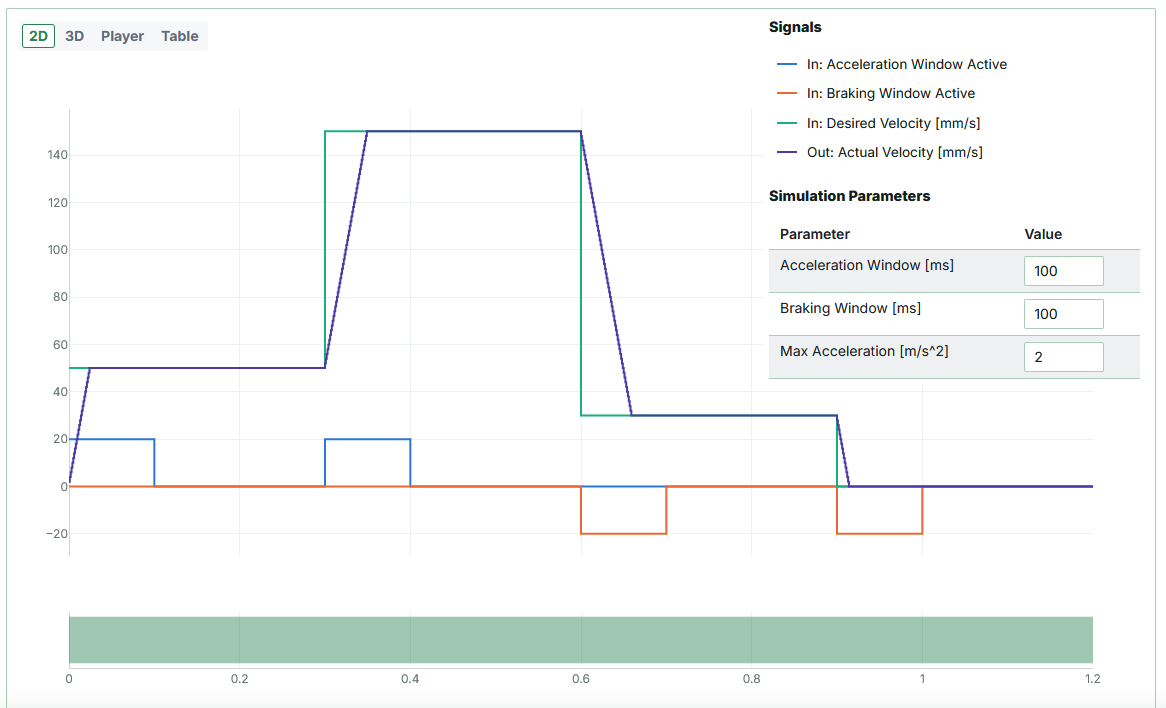
Run with a limit of 2 m/s². Actual Velocity in the chart is the controller's commanded output, the value RampStep returns, not the measured velocity of a machine. The blue and orange traces mark the 100 ms acceleration and braking windows, and the green bar shows that both requirements passed.
Explore Behavior Through Simulation
A single simulation shows how the algorithm behaves with one parameter configuration, but engineering decisions rarely involve only one. In the velocity-ramp example, the acceleration limit directly shapes the response: a higher limit lets the commanded velocity approach the requested value more quickly, while a lower limit produces a slower transition. Instead of adjusting the parameter by hand and inspecting each result separately, we can use a parameter sweep to execute the same algorithm repeatedly with different values. The production code and the input sequence stay the same; only the selected parameter changes.
The sweep below repeats the comparison from the earlier article with acceleration limits of 4, 2, and 1 m/s². The configurations using 4 and 2 m/s² satisfy both timing windows, while 1 m/s² fails: braking from 150 to 30 mm/s takes 119 ms, longer than the 100 ms braking window. That is more useful than observing that one curve rises faster than another, because it connects the behavior of the implementation to a measurable engineering requirement.
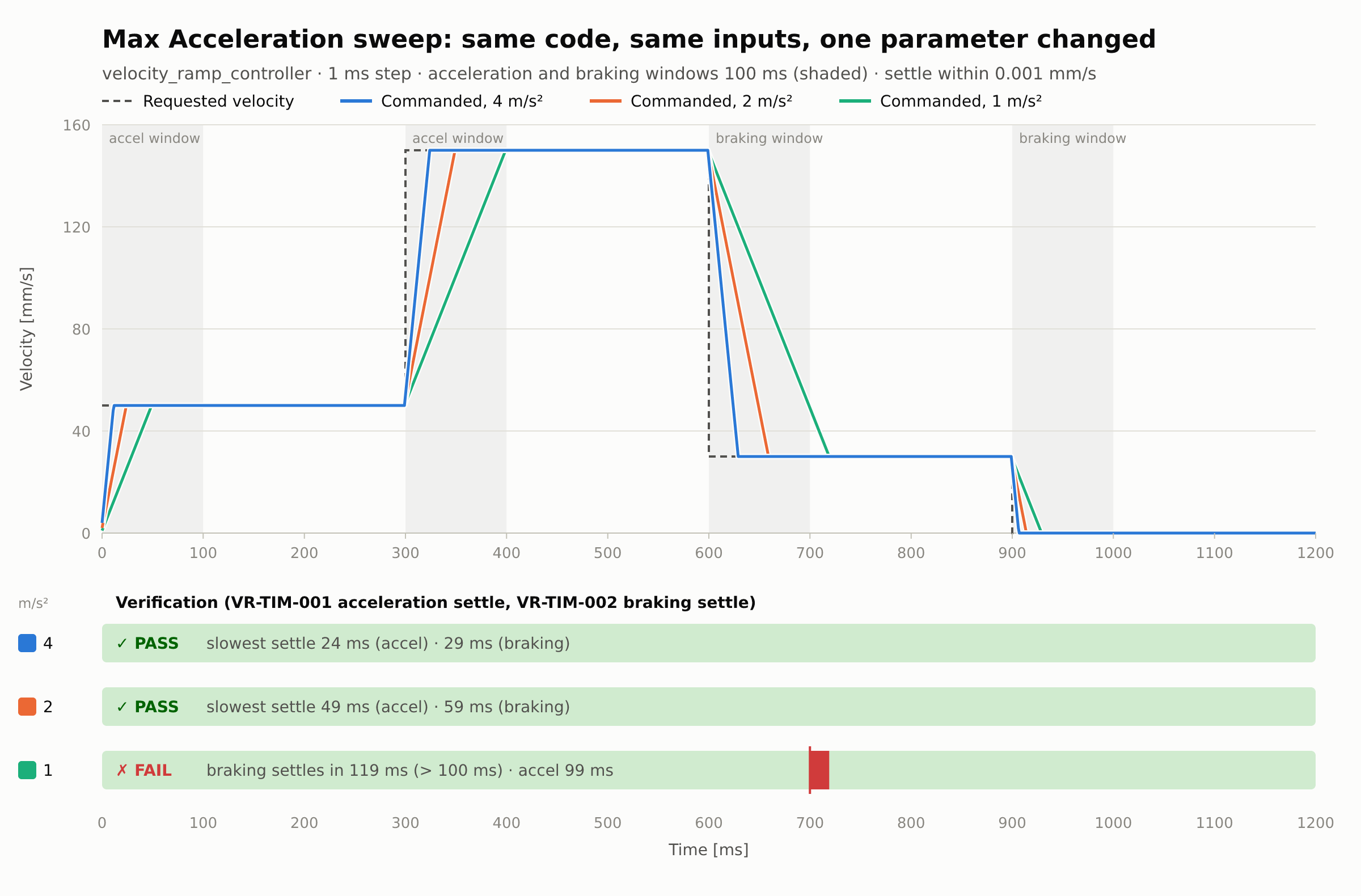
A sweep can extend this investigation across a wider range of values, showing which configurations satisfy the criteria and how the behavior changes between them. Several configurations may pass the same test while producing noticeably different responses, one approaching the requested velocity quickly and another more gradually. Neither is automatically the better choice: the right configuration depends on the requirements and on how the resulting commands affect the machine.
This is where code-first simulation becomes particularly useful during development. Engineers can explore the behavior of the existing implementation, evaluate parameter changes, and compare alternatives without rebuilding the control algorithm in a separate modeling environment. The same applies when the implementation itself changes: a modified algorithm can be executed with the same inputs and evaluated against the same criteria. The simulation becomes a practical way to investigate design decisions, rather than merely a way to visualize signals.
Add Context When Necessary
So far, the investigation has focused entirely on the control algorithm. We have observed its output, compared parameter configurations, and checked whether the simulated behavior satisfies specific software-level requirements. That doesn't establish how the physical machine will behave. The velocity commanded by the controller is not necessarily the velocity achieved by a hydraulic cylinder, an electric motor, or a mechanical mechanism, because hydraulic dynamics, mechanical loads, friction, actuator limitations, and other physical effects all influence the actual movement.
If the goal is to verify that the controller respects its acceleration limits, executing the control algorithm may provide enough information. If we need to investigate oscillations, hydraulic pressure variations, or the movement of a loaded crane boom, we must add an appropriate representation of the physical system: a simplified mathematical model or a more detailed simulation, depending on the behavior in question. Code-first simulation does not remove the need for these models. It provides a starting point that can be extended when more information becomes necessary.
Recorded data from real machines is another valuable source of that information. During machine testing, engineers often encounter behavior that is difficult to reproduce, such as an experienced operator noticing an uncomfortable transition or an unexpected response under particular operating conditions. When the relevant commands, sensor signals, and parameters have been recorded, they can be used as inputs to the control software in simulation. Instead of relying only on artificial input sequences, we can investigate the algorithm under conditions captured during actual operation, change parameters or implementation details, and compare the results against the same recorded inputs.
This approach has an important limitation. Had the modified controller been running on the real machine, it might have produced different movements, which would in turn have changed the subsequent sensor signals. Replaying historical inputs therefore tells us how the software responds to those inputs, not necessarily how the machine would respond to the modification. For that, we need an appropriate closed-loop model or further testing on the machine.
These approaches complement each other. Recorded data helps reproduce and investigate software behavior, physical models help predict how the software interacts with the machine, and real-machine testing provides evidence about actual performance. Experienced operators remain especially important for judging responsiveness, smoothness, and the overall feel of the machine. The objective is not to replace one approach with another, but to bring in the information each stage of the investigation needs.
A Shorter Path From Implementation to Understanding
The velocity-ramp example shows how a relatively small experiment can provide useful engineering evidence. By executing the production implementation with defined inputs, comparing parameter configurations, and evaluating the results against measurable requirements, engineers can investigate software behavior without first building a complete model of the machine. As the questions become more demanding, recorded machine data, physical models, and real-world testing add the information the code alone cannot provide.
This matters more as AI-assisted development makes alternative implementations easier to produce. The engineering challenge is not simply generating more code, but understanding which changes improve the behavior and which introduce new problems.
Code-first simulation helps shorten that feedback loop: start with the production code, investigate its behavior, and add the context needed to make the next engineering decision.
The complete velocity-ramp simulation, including its parameters and validation windows, is available in the simulation code. For a broader comparison of simulation approaches, see What Level of Simulation Do You Really Need?.