Plot any signal from C/C++ to your workspace
You already print values to see what your code does. gprintf is a printf that draws instead: swap one for the other, and the value shows up as a live time graph in your CppModel workspace while the program runs.
printf("speed=%f\n", speed);      /* before */
gprintf("motor.speed", speed);    /* after: a live graph in the workspace */
It works in code that is already running: a bench program, a hardware-in-the-loop rig, a real-time loop, a long computation, a Python or Node.js script. There is no simulation to write, no step size and no end time. Each call records the value with the time it was made, and the library sends the values in the background, so a call never waits for the network.
gprintf needs SDK 0.18.0 or later.
An example
A speed controller on a motor bench, logging its setpoint, speed and current every 10 ms:
#include <math.h>
#include <time.h>
#include <cppmodel/gprintf.h>

int main(void)
{
    double speed = 0.0, integral = 0.0;
    struct timespec tick = {0, 10 * 1000 * 1000}; /* 10 ms */

    gp_init("motor-bench"); /* optional: names the stream */

    for (int i = 0; i < 600; ++i)
    {
        double setpoint = i < 100 ? 0.0 : (i < 350 ? 1500.0 : 800.0);
        double error = setpoint - speed;
        integral += 0.02 * error * 0.01;
        double voltage = fmin(fmax(0.05 * error + integral, 0.0), 48.0);
        double current = voltage / 0.8 - speed / 400.0;
        speed += (voltage * 60.0 - speed) * 0.01 / 0.4;

        gprintf("motor.setpoint", setpoint);
        gprintf("motor.speed", speed);
        gprintf("motor.current", current);

        nanosleep(&tick, NULL);
    }
    return 0;
}
Build it like any program that uses the library (see Installation), and run it. On its first successful send it prints where to look:
Stream: motor-bench, run ba06a433a55b5fad85a8e554e1faf618
UI: https://w12345.cppmodel.com/streams/motor-bench
Open the link while the program runs, and the graphs grow as the values arrive.
C
#include <cppmodel/gprintf.h>. The header is self-contained over the library's C API.
| Call | Does |
|---|---|
gprintf(signal, value) | Records value for signal now. Integers and booleans work too: they convert to double. |
gp_init(name) | Optional. Names the stream; call it before the first gprintf. Returns 1, or 0 with a message. |
gp_init_with(name, flushInterval_ms, bufferSamples) | The same, with the send interval and the samples kept per signal; 0 keeps the default. |
gp_flush() | Optional. Waits until everything logged so far has reached the workspace. Returns 1, or 0 with a message. |
gp_shutdown() | Optional. Sends what is left and closes the stream; it is also done at exit. |
C++
gprintf is in cppmodel/cppmodel.hpp and takes any arithmetic type. cppmodel::Stream names the stream and closes it when it goes out of scope:
#include <cppmodel/cppmodel.hpp>

int main()
{
    cppmodel::Stream stream("motor-bench"); // optional; sends what is left when it goes out of scope

    while (running)
    {
        // ...
        cppmodel::gprintf("motor.speed", speed);
        cppmodel::gprintf("motor.enabled", enabled); // bool, int, float, double...
    }
    stream.Flush(); // optional: wait until everything has been sent
}
Stream(name, flushInterval_ms, bufferSamples) takes the same settings as gp_init_with. It throws cppmodel::Error when the stream already started under another name.
Python and Node.js
The cppmodel packages on PyPI and npm (see Python and Node.js) have the same two functions:
import cppmodel

with cppmodel.Stream("motor-bench"):          # optional: names the stream
    while running:
        cppmodel.gprintf("motor.speed", speed)
const { gprintf, Stream } = require('cppmodel');

const stream = new Stream('motor-bench');     // optional: names the stream
gprintf('motor.speed', speed);
stream.close();                               // optional: done at exit anyway
stream.flush() waits until everything so far has been sent.
The Streams view
Streams have their own tab in the workspace, next to the simulations. It lists your streams, or your team's, with the status of each one's latest run: Live while the program runs, Finished when it ended normally, and Stopped when it stopped sending without ending, for example after a crash.
A stream's page draws its signals live, with the legend and the table view as for a simulation:
- The graph refreshes about once a second while the program runs. Pause freezes it while you look.
- Each run of the program is one run of the stream. When the program starts again, the new run replaces the old one on the page.
- Values are joined by straight lines, not held as steps as in a simulation, because each one is a sample taken at its own time.
- A NaN or infinity shows as a gap.
- Copy the link to show a colleague the same live graph.
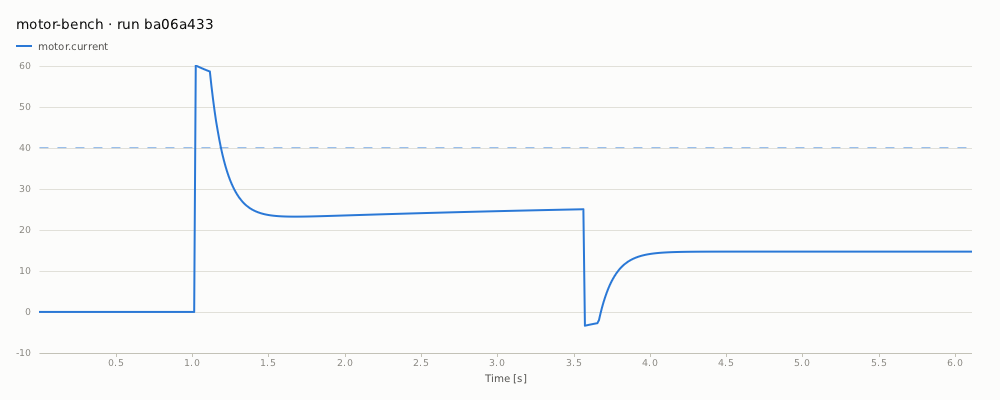
Windows and bands work here too. Log CppModel.Window.<name>.active to shade a phase, or CppModel.Band.<signal>.min / .max to draw a limit on a signal:
gprintf("CppModel.Band.motor.current.max", 40.0); /* the current limit, drawn on motor.current */
gprintf("CppModel.Window.ramp.active", ramping);  /* shaded while ramping */
The motor bench above, with that current limit logged, shows where the start-up current goes over it:
Naming the stream
A stream is named like a simulation, and the name is where its runs collect in the workspace. Without gp_init or a Stream, the first gprintf starts the stream without a name, and the workspace files it under the program's name (for Python and Node.js, the script's).
There is one stream per process, and each execution of the program is one run of it. Name it before the first gprintf: naming it afterwards, or with a second name, fails with a message and the stream keeps its first name.
Each run records the same identity as a simulation's execution: CppModel.BinaryFingerprint for the executable, and CppModel.GitHash for the commit it was built from.
How values are sent
- A call never blocks.
gprintfputs the sample in a buffer in memory. A background thread signs in and sends the buffers every 500 ms, and once more when the program exits. - The buffer is bounded. Each signal keeps its last 10,000 samples until they are sent. If the workspace can't be reached for a while, the oldest samples are dropped, and the workspace reports how many.
- Failures don't stop your program. When the workspace can't be reached, the samples are kept and sent again. When you aren't signed in, or the workspace doesn't accept streams, a message is printed once and the program carries on without sending.
- Signing in works as for a simulation: the saved login,
CPPMODEL_USERNAMEandCPPMODEL_PASSWORD,CPPMODEL_ACCESS_TOKEN, or the browser prompt (see Running the simulation). It happens in the background. - Killed processes lose at most the last half second of samples. Call
gp_flush()before something that may end the process. - A stream has at most 1,000 signals.
Turning it off
Leave gprintf calls in the code and turn them off where you don't want them, for example in a production build or a CI job without credentials:
| Variable | Default | Effect |
|---|---|---|
CPPMODEL_STREAM | on | off (or 0, false, no) discards every sample, without signing in |
CPPMODEL_STREAM_FLUSH_MS | 500 | How often samples are sent, in milliseconds |
CPPMODEL_STREAM_BUFFER | 10000 | Samples kept per signal until they are sent |
CPPMODEL_STREAM_EXIT_TIMEOUT_MS | 5000 | How long a flush, or the send at exit, keeps trying |
Settings given in code (gp_init_with, Stream(...)) take precedence over the environment.
gprintf or a simulation?
gprintf shows what running code does. A simulation tests what code does, and is the better tool once you want a test:
| gprintf | Simulation | |
|---|---|---|
| Time | Wall-clock, as the program runs | Simulated, in fixed steps, faster than real time |
| Code needed | One call per value | A step function, inputs and outputs |
| Repeatable | No: each run is whatever happened | Yes: the same inputs give the same run |
| Pass or fail | No | Per step, with verification rules, as an exit code for CI |
| Inputs and parameters | Not read from the workspace | Set in the workspace or from a file, without rebuilding |
| History | The latest run of each stream | Every execution, compared across builds and commits |
A common path is to start with gprintf on the bench to see the behaviour, then move the interesting case into a simulation, where it runs in CI and can't silently regress. A gprintf inside a simulation still goes to the process's own stream, with wall-clock times, not to the execution: record simulation values as outputs.